
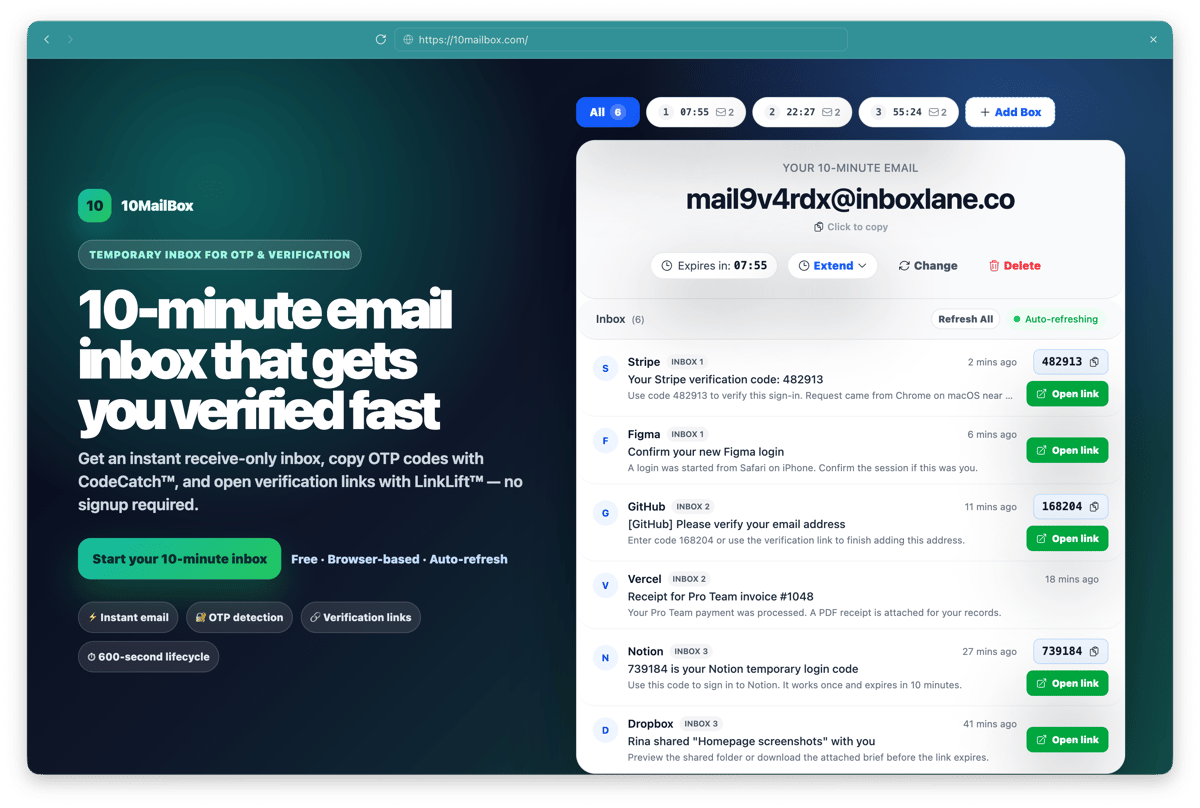
10MailBox gives you a fast temporary inbox for verification emails, OTP codes, and short-lived signup tasks.
A 10-minute email address gives you a temporary inbox for quick verification tasks without exposing your real email address. 10MailBox means 10-minute mailbox, and its 10Box Mode lets you manage up to 10 active temporary inboxes at the same time. This guide explains when to use the core 10-minute inbox, when to avoid it, and how to receive your first message safely.
What exactly is a 10-minute email address?
A 10-minute email address is a temporary, disposable inbox designed to receive messages for a short period before automatically expiring. The address is useful when a website needs to send one confirmation email, one OTP code, or one activation link.
The important limitation is that the inbox is not permanent. If the service asks for an email you may need months later for password recovery, billing, or account ownership, use a real address you control.
Use the 10MailBox tool
The 10MailBox tool appears above this guide and on the homepage: open the 10-minute email inbox. It generates the temporary address, shows the countdown, receives messages, and displays the inbox state in one place.
Keep the inbox tab open while you complete the external signup or verification form. If you close the tab or wait too long, the inbox may expire before the email arrives.
Step-by-step: How to receive your first temporary email
- Open 10MailBox and wait for the temporary address to appear.
- Click copy so the exact address is saved to your clipboard.
- Paste the address into the website, app, test form, or newsletter signup that asks for email verification.
- Submit the form and return to the 10MailBox tab.
- Watch the inbox for the incoming message while the 10-minute countdown is active.
- Copy the OTP code or open the verification link from the received message.
- Finish the external verification step before either the OTP or the temporary inbox expires.
Best use cases: When should you use a temporary inbox?
You should use a temporary inbox for low-risk tasks where the email is only needed once. Common examples include testing registration flows, previewing newsletters, receiving one-time verification emails, trying software demos, and protecting your primary inbox from marketing follow-ups.
A 10-minute email is also useful for QA teams and makers. You can test signup flows repeatedly without polluting a real mailbox or creating long-lived test identities.
Using it for OTP codes
A 10-minute inbox works well when a website sends a short email OTP. Copy the temporary address, request the code, then return to the inbox and use the code before it expires.
For a focused walkthrough, read 10-Minute Email for OTP Codes. That page explains code lengths, missing-code troubleshooting, and safe limits for OTP workflows.
Using it for verification links
A 10-minute inbox also works when a website sends a confirmation link. The main difference is that you need to open the correct link from the message before the inbox and the sender-side token expire.
For link-based workflows, read Quick Email for Verification Links. That page explains why verification emails are delayed, what to check when a link does not arrive, and when temporary email is not suitable.
When should you NOT use a 10-minute email?
Do not use a 10-minute email for important accounts, banking, cryptocurrency exchanges, healthcare portals, legal documents, work tools, payment services, or any service where you need long-term access or password recovery. If losing the inbox would lock you out later, the account is not a good fit for temporary email.
You should also avoid using temporary addresses to violate another service's terms. If a website blocks disposable email domains, use a standard email method for that specific service.
What happens after the 10-minute timer expires?
After the 10-minute timer expires, the temporary inbox is no longer intended to receive or preserve messages. Treat every message in the inbox as short-lived and copy any required code or link immediately.
Expiry is a feature, not a bug. The purpose of the service is to complete a short verification task without creating a permanent inbox.
FAQ
Do I need to sign up for 10MailBox?
No. The core 10MailBox flow is designed to generate a temporary inbox without a permanent account.
Can I use the same temporary address tomorrow?
No. A 10-minute email address is short-lived and should not be treated as a reusable identity.
What if the email never arrives?
Check that you pasted the address correctly, wait briefly for sender-side delivery delays, and confirm the target website does not block temporary email domains. More answers are available in the [10MailBox FAQ](https://10mailbox.com/faq).